← HomepageAll repository proofValidation recordState of TS Architecture 2026
Repository proof
What ArcSight found in Next.js
The first file to open in Next.js is src/server/config-shared. A change there reaches 423 of 1,942 modules.
This lead file reaches 22% of the graph. The median published proof reaches 60%.
Median 60%. Thick bar is blast share. Thin bar is fan-in.
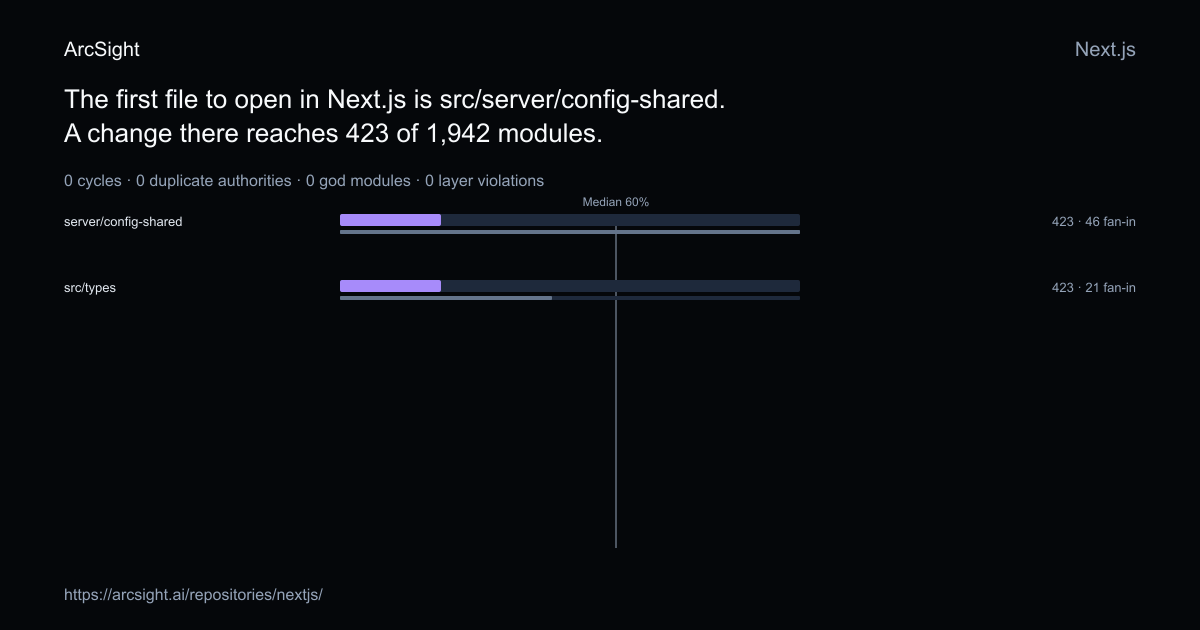
Real arc impact on Next.js (packages/next) — blast radius, break paths, and evidence. Same question as the homepage: what breaks if I change this?
Project: Next.js (packages/next) · Score: 89/100 (A) · 1,942 modules · 4,489 edges · TypeScript · Language score median 80.1
- Cycles
- 0
- Duplicate authorities
- 0
- God modules
- 0
- Layer violations
- 0
arc impact src/server/config-sharedUnder 3 minutes to first arc impact on a TypeScript monorepo (internal runs).
Modules to inspect
Ranked by blast radius. Fan-in is direct dependents. Blast radius is downstream modules reachable from that file.
Next.js
| Rank | File | Fan-in | Blast | Share |
|---|---|---|---|---|
| 1 | src/ central orchestrator | 46 | 423 | 22% |
| 2 | src/ shared utility hub | 21 | 423 | 22% |
Nearby proofs
- egg 84.8/100 · 1,174 modules
- Payload CMS 71.6/100 · 822 modules
- voltagent 70/100 · 819 modules
Snapshot notes
In vercel nextjs, a change that begins in types keeps traveling until it reaches server config-shared, with shared app-router-types as the third file on that walk and the next-next-devtools group as the group around them, snapshot mark nextjs.
server lru-cache is worth opening beside types because shared segment still participates when server lru-cache moves, and server request-meta stays in view for vercel nextjs, snapshot mark nextjs.
Review request params only after server config-shared and shared utils are both on the table, since the link from server app-render back to shared app-router-types belongs to vercel nextjs under snapshot mark nextjs.
types and server config-shared are later stops, and a reviewer who has already seen shared app-router-types should still look at server lru-cache before treating the next-next-devtools group as understood for vercel nextjs, snapshot mark nextjs.
server lru-cache closes the file list after shared segment and types, which keeps the vercel nextjs note tied to snapshot mark nextjs, and the files named in this paragraph are the ones the review is willing to stand on.
Dependency corridors
Repeated paths where changes propagate through the same modules.
- src/server/config-shared → src/server/request-meta → src/server/request/params
- src/types → src/shared/lib/utils → src/server/app-render
Subsystem overview
- next-next-devtools (120 modules)
- client-app-call-server (85 modules)
CLI workflow
Impact, then scan, fix, finish, and watch.
arc impact <file>See what a change breaksarc scanFind issuesarc fixApply fixesarc finishResolve remainingarc watchKeep clean
FAQ
- Which file should change first in vercel nextjs: types?
- Start with types, because the rest of the vercel nextjs walk leaves from that file and server config-shared is the next file in the same review, snapshot mark nextjs and the note stays with this review.
- What else is on the vercel nextjs walk besides types and shared app-router-types?
- shared app-router-types and server lru-cache stay on the walk with shared segment, which are different files from types inside the next-next-devtools group for vercel nextjs, snapshot mark nextjs.
- How should a reviewer use server request-meta in the vercel nextjs snapshot?
- Keep server request-meta, request params, and shared utils open together, then check server app-render before merging the vercel nextjs change, snapshot mark nextjs.
- Where does the vercel nextjs review stop after types?
- Stop after types, server config-shared, and shared app-router-types have been compared with server lru-cache, leaving the next-next-devtools group until those vercel nextjs files are clear, snapshot mark nextjs.
Run ArcSight on your repo
Install locally, then run arc impact on the file you plan to change — before merge.
Embed this report
Use this iframe to show the architecture badge on your site.
<iframe src="https://arcsight.ai/embed/nextjs/" width="320" height="180" frameborder="0"></iframe>Explore
Evidence-backed analysis snapshot. Validation record · Install · Homepage demo